CloudCasa DR Failover Guide
Once one or more DR Plans are in place for a cluster, CloudCasa DR can be used to quickly fail over workloads from the source cluster to the target cluster in the event of a disaster. (For a guided tour through the setup process, see the CloudCasa DR Setup Guide.) Failover is accomplished using DR Recovery jobs. These can be defined in advance so that they can be initiated quickly when needed.
Failover
If there is a problem with the primary site or if you want to migrate the workloads to the DR site, you will need to perform a failover. This is achieved by creating and running a “DR Recovery” job. Note that you can also do a failover of a subset of resources defined in a DR Plan (although only if namespaces are selected in the DR Plan).
To define a DR Recovery job, go to the DR/Recovery Jobs page and click Add DR Recovery job. Select the workloads you want to recover. The default is to recover all workloads in the DR Plan. In the “Transforms” step, you can provide VM options and resource modifiers. Resource modifiers allow you to customize how Kubernetes resources are created by modifying their specifications during the failover process. If this option is enabled, you can upload a YAML file containing a description of which resources should be modified and how to modify them.
See also
For more information on DR Recovery jobs, see DR Recovery Jobs.
For more information on resource modifiers, see Resource Modifiers.
Before running a DR Recovery job, it is highly advisable to scale down Deployments and StatefulSets and power off VMs. This will help assure that all the data is flushed to storage and replicated. Of course, if the cluster or site is not accessible, then this step can be skipped. When a DR Recovery job is run, the displayed job type is “DISASTER_RECOVERY”.
What happens during failover
During failover, CloudCasa validates that disaster recovery can proceed and verifies that no resources on the target site would block successful recovery.
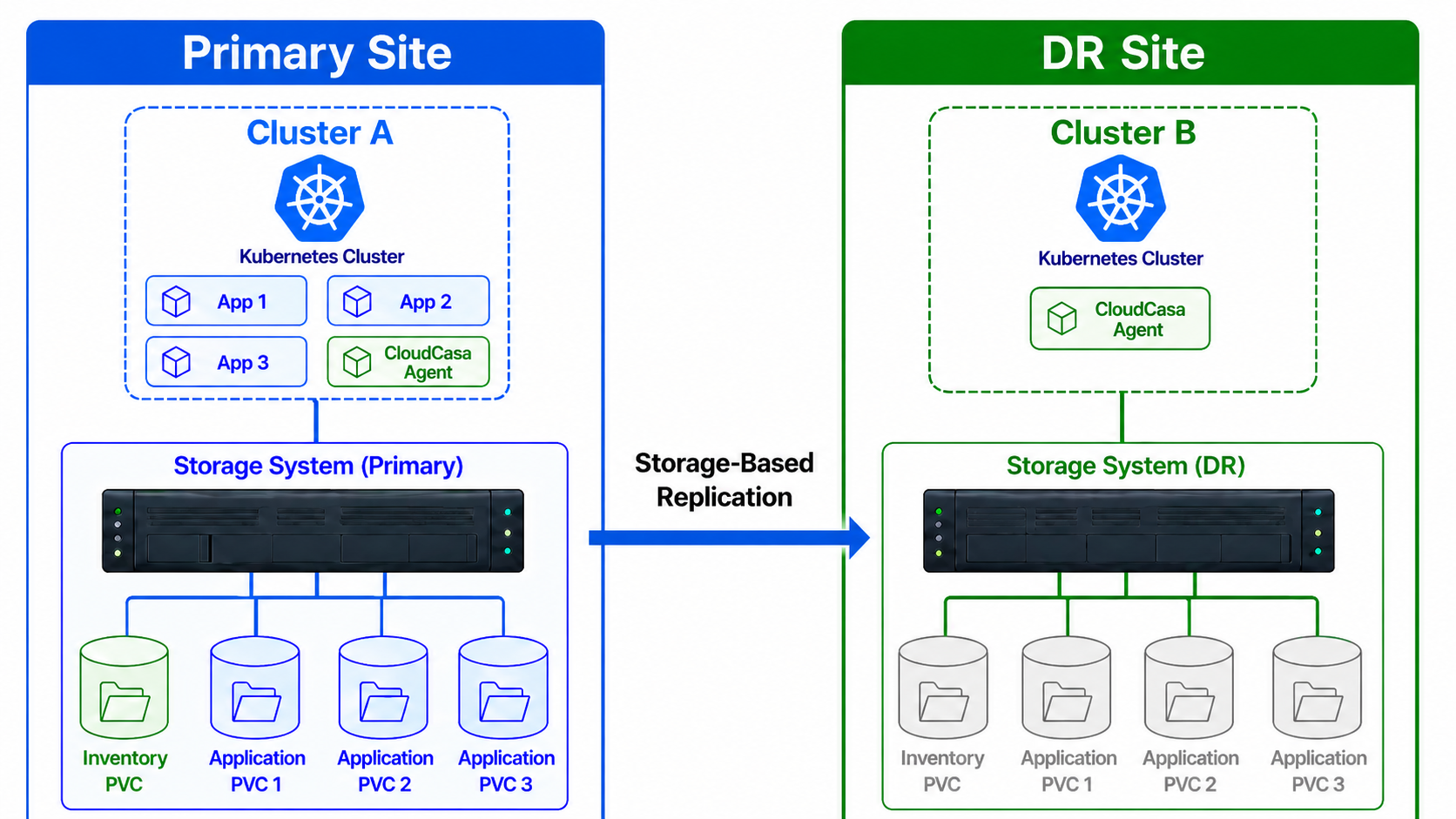
CloudCasa begins by synchronizing the consistency group associated with the inventory PVC. In Longhorn/SUSE Storage environments, this corresponds to synchronizing the associated volume backups. For Dell PowerStore, this corresponds to synchronizing the associated volume groups. Because PowerStore fails over complete volume groups, workloads with different recovery requirements should be placed in separate volume groups. If synchronization fails, CloudCasa continues with the failover process. It then invokes the storage system to fail over the consistency group. For Longhorn/SUSE Storage, CloudCasa activates the Disaster Recovery volume.
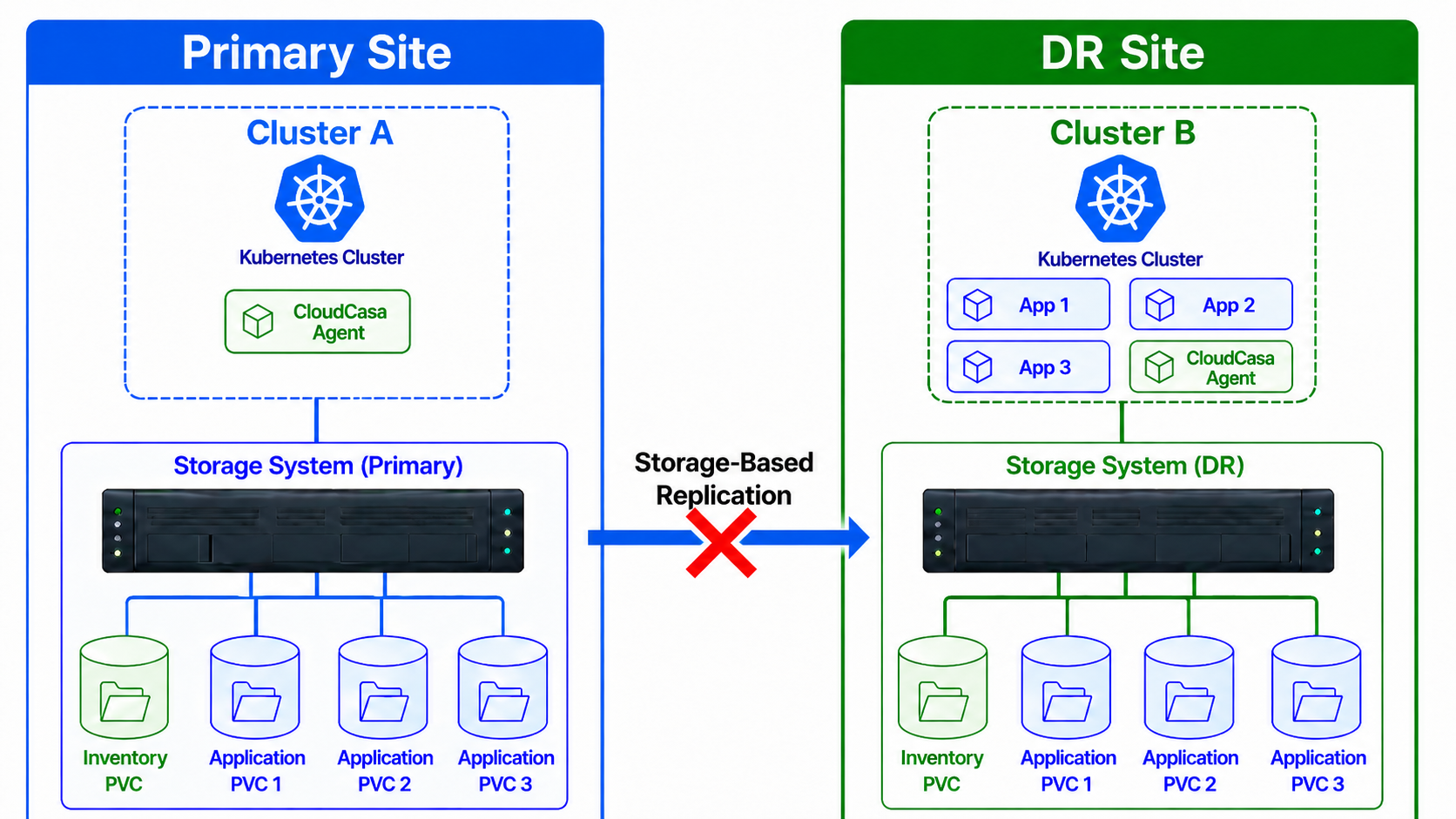
When the consistency group failover is complete, CloudCasa restores the PVCs, PVs, and any required Custom Resources. It waits for the PVCs to reach the Bound state, then starts the DR Agent on the new primary site. After the DR Agent starts, CloudCasa repeats the same workflow for the workloads selected during DR Recovery job creation: synchronization, failover, and volume restoration. At the end of the recovery, the workloads should be running on the target cluster.
An important point to note is that once a failover is done, the corresponding DR Plan and DR Recovery job cannot be used anymore. This is because the inventory PVC on the source cluster will have been failed over, and cannot be written to any longer. If you only failed over a subset of the cluster’s workloads, and you still need DR for workloads that have not been failed over, you will need to define a new DR plan. You can either create one from scratch, or clone the existing DR plan (using Actions -> Clone) and select new workloads and a new Inventory PVC.
Pre-failover diagram
Post-failover diagram
Failback
Failback is a disaster recovery operation that moves workloads from the DR site back to the Primary site. Users must create the appropriate DR Plans and DR Recovery jobs before initiating failback.
What happens during failback
In Longhorn/SUSE Storage environments using Longhorn Disaster Recovery Volumes, failback works the same way as failover.
In HPE Alletra Storage array environments using HPE Remote Copy, the failback workflow depends on the state of the discovered consistency groups. When consistency groups are in the “Primary-Reverse” state, CloudCasa first issues a “Recover” command to reverse the replication direction and synchronize any changed data. Once all volumes are synchronized, CloudCasa issues a “Restore” command to return the consistency groups to their original, pre-failover roles.
After the storage-side operations are complete, CloudCasa restores the inventory volume on the Primary site first. Once the inventory volume is restored and the DR agent process starts, it restores the Kubernetes resources and their corresponding volumes.
It is important to note that the “Recover” and “Restore” commands are run against the current primary site, the DR site. The Kubernetes resource restore, however, occurs on the Primary site. As a result, both clusters and both storage systems must be reachable during failback.
If the discovered consistency groups are already in the “Primary” state, CloudCasa uses the same process described in the failover section.
In Dell PowerStore environments, CloudCasa first issues a “Reprotect” command to reverse the replication direction of the affected volume groups. PowerStore then resynchronizes only the data that changed since the failover. Once the volume groups are synchronized, CloudCasa scales down the workloads on the DR site and fails the volume groups back to the Primary site’s array. CloudCasa then restores the inventory volume, followed by the Kubernetes resources and their corresponding volumes, on the Primary site. As with HPE Alletra, both clusters and both storage systems must be reachable during failback.